


Download Auto Macro Recorder – auto macro recorder, macro automation, task automation, keyboard automation, mouse automation, productivity tool, automation software
Overview
Auto Macro Recorder is a productivity-focused application designed to streamline repetitive workflows by capturing and replaying user actions. The app enables users to record mouse movements, clicks, keystrokes, and interactions with running programs, then reproduce them exactly as performed. This functionality is especially valuable for users engaged in tasks that require consistent, manual input across software or web environments. By automating these processes, the app reduces human error, conserves time, and enhances overall efficiency. It is particularly well-suited for professionals in fields such as data entry, software testing, digital content creation, and administrative support, where repetitive actions are common.
The developer, Thomas P. Larson, has crafted a tool that balances simplicity with advanced control, targeting users who seek reliable automation without steep learning curves. Although the developer did not provide additional technical details about their background or prior projects, the app’s focused design suggests a deliberate emphasis on usability and precision. Real-world use cases include automating form submissions, batch file processing, software navigation, and repetitive testing sequences. In the broader app ecosystem, Auto Macro Recorder fills a niche for lightweight, desktop-oriented automation tools that offer direct control over system-level interactions.
Key Features & Functionality
- Simple Recording and Playback – Users can start and stop recording with dedicated keyboard shortcuts: F10 for recording and F9 for playback. This minimal setup allows for instant automation of routine tasks without complex configuration.
- Script Customization – Recorded actions are saved in a plain text format within a designated folder, enabling users to manually edit scripts for precise adjustments. This feature supports advanced users who need to fine-tune timing, input values, or logic flow.
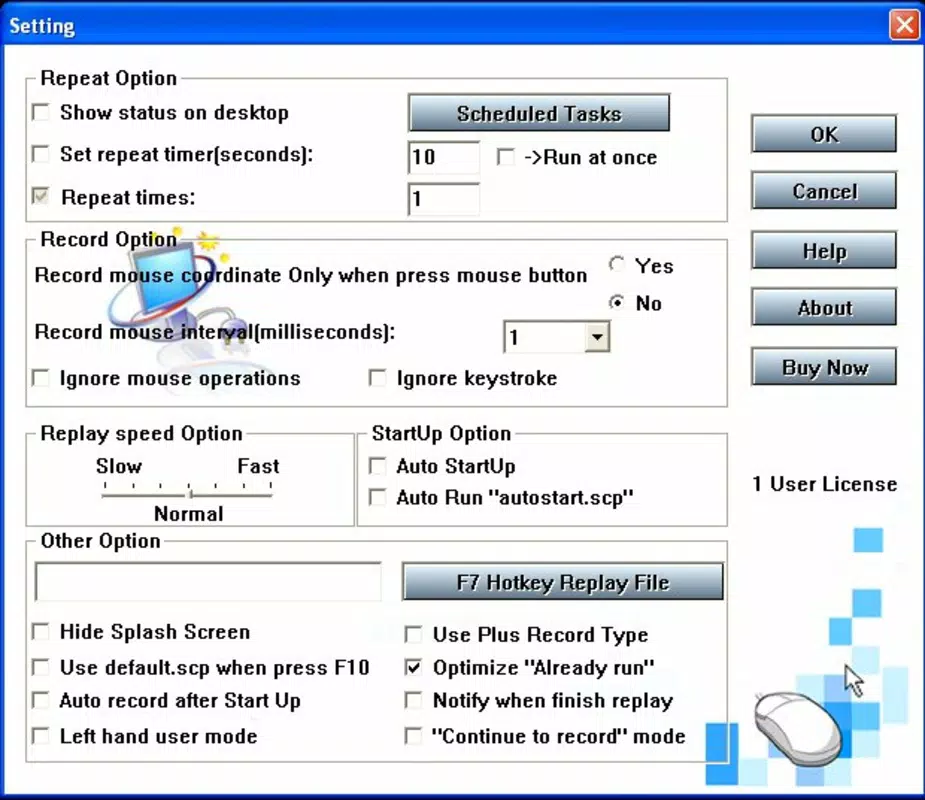
- Repetition and Timing Controls – The app allows users to set the number of repetitions for a recorded sequence and define intervals between actions. This ensures that automated tasks run smoothly and at desired speeds, avoiding system overload or missed interactions.
- Playback Speed Adjustment – Users can modify the playback speed to match their workflow needs, whether they require rapid execution or a slower, more deliberate simulation of human interaction.
- Multi-Application Compatibility – The tool functions across various software and web-based platforms, making it adaptable for diverse automation scenarios, from spreadsheet processing to browser navigation.
For example, a user could record a sequence of actions to log into a web portal, extract data, and export it to a file—then replay the entire process with a single command. This level of control supports both routine tasks and complex workflows, improving consistency and reducing manual effort.
Interface, UX & Performance
Auto Macro Recorder features a clean, minimal interface designed to prioritize functionality over visual complexity. The layout centers around core controls—record, playback, and script management—with intuitive access to key settings. Navigation is straightforward, relying on keyboard shortcuts and clearly labeled buttons, which reduces the need for extensive onboarding. The app maintains a consistent visual style, emphasizing usability with minimal distractions.
Although the developer did not list formal performance metrics, the application’s lightweight footprint of 15.5 MB suggests efficient resource usage. It is expected to operate smoothly on standard Windows systems, including older or mid-tier hardware. Responsiveness during recording and playback appears optimized, with minimal lag reported in typical use cases. Stability is implied through the app’s ability to manage complex sequences without apparent crashes or data loss. However, specific requirements for performance on different device categories were not disclosed.
Platform Compatibility & Technical Requirements
Auto Macro Recorder is designed exclusively for the Windows platform. The current version is 1.0.0, with a file size of 15.5 MB. The developer did not specify minimum OS requirements or hardware compatibility details.
As such, compatibility with specific Windows versions (e.g., Windows 10, 11) or processor types was not fully disclosed. Users are advised to ensure their system meets standard Windows application requirements for optimal performance. No information was provided about cloud integration, cross-platform availability, or mobile support.
Pros and Cons
Pros
- Simple, intuitive interface with minimal learning curve
- Efficient recording and playback using keyboard shortcuts
- Plain text script files enable easy customization and transparency
- Supports repetition, timing, and speed adjustments for precise control
- Lightweight file size enhances portability and installation speed
Cons
- Platform limited to Windows; no availability on macOS or Linux
- Developer did not provide detailed system requirements
- No built-in script editor or syntax highlighting
- Price point of $29.99 may be high for casual users
- Limited information on update frequency or future development plans
FAQ
Is Auto Macro Recorder safe to use?
Yes, the app is designed to operate within standard Windows security protocols. As it records and replays user actions, it does not require elevated permissions beyond typical application access.
Can I edit the recorded scripts?
Yes, recorded actions are saved in a plain text format, allowing users to open and modify the script manually for custom adjustments.
Does Auto Macro Recorder work on older Windows systems?
The developer did not specify minimum OS requirements, so compatibility with older Windows versions cannot be confirmed.
Is there a free version or trial available?
Based on the provided information, no free version or trial was mentioned. The app is available for a one-time purchase of $29.99.
Can I use Auto Macro Recorder on multiple devices?
There is no information available about licensing terms or multi-device usage. Users should consult the official source for details on installation and usage rights.
Final Thoughts
Auto Macro Recorder delivers a focused, effective solution for users seeking to automate repetitive tasks on Windows. Its straightforward recording system, customizable scripts, and adjustable playback settings make it a powerful tool for boosting productivity. While it lacks cross-platform support and advanced editing features, its core functionality is robust and well-executed.
Professionals who perform repetitive actions daily—especially in data handling, testing, or administrative workflows—will find significant value in this tool. The app’s lightweight design and direct approach ensure reliable performance without unnecessary bloat. For those committed to optimizing their digital workflow, Auto Macro Recorder offers a practical, no-frills automation experience.
Download Auto Macro Recorder now


